Crontab Syntax: A Complete Reference for Cron Expressions
Master crontab syntax with this complete reference. Learn the 5-field cron format, special characters, @reboot/@daily shortcuts, and common schedule patterns.
- cron
- crontab
- linux
- scheduling
- sysadmin
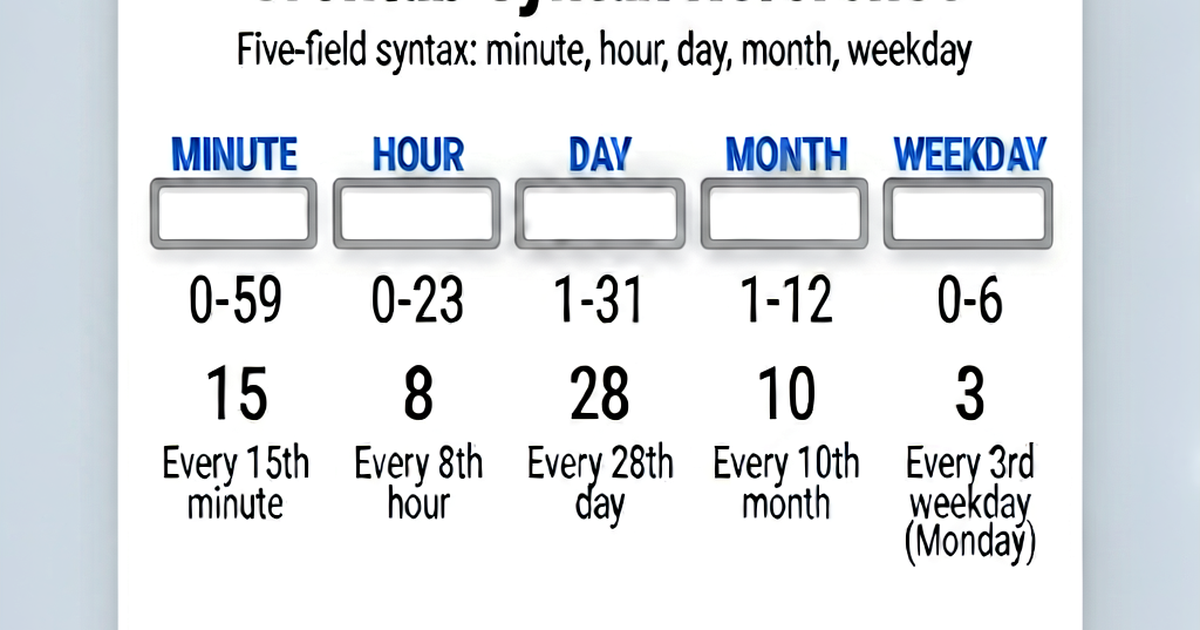

Cron is a time-based job scheduler built into Unix-like systems. A crontab file contains lines that define when commands should run. Understanding the syntax is the foundation of automating server tasks.
The 5-field format
Each line in a crontab has five time fields followed by the command to run:
* * * * * command to execute
│ │ │ │ │
│ │ │ │ └─── Day of week (0-7, 0 and 7 are Sunday)
│ │ │ └───── Month (1-12)
│ │ └─────── Day of month (1-31)
│ └───────── Hour (0-23)
└─────────── Minute (0-59)
A * in any field means “every valid value for that field.”
Special characters
Asterisk * — every value
* * * * * /script.sh    # Run every minute
0 * * * * /script.sh    # Run at minute 0 of every hour
Comma , — list of values
0 9,12,18 * * * /script.sh    # Run at 9am, 12pm, and 6pm
0 0 1,15 * * /script.sh       # Run on 1st and 15th of each month
Hyphen - — range of values
0 9-17 * * * /script.sh       # Run at every hour from 9am to 5pm
0 0 * * 1-5 /script.sh        # Run at midnight Monday through Friday
Slash / — step values
*/5 * * * * /script.sh        # Run every 5 minutes
0 */2 * * * /script.sh        # Run every 2 hours
*/15 9-17 * * 1-5 /script.sh  # Every 15 min during business hours, weekdays
*/5 means “every 5 units starting from 0” — so for minutes: 0, 5, 10, 15, 20, 25, 30, 35, 40, 45, 50, 55.
Special strings (shortcuts)
These replace all five fields:
| String | Equivalent | Meaning |
|---|---|---|
@reboot | (none) | Run once at system startup |
@yearly / @annually | 0 0 1 1 * | Once a year (Jan 1, midnight) |
@monthly | 0 0 1 * * | First day of each month |
@weekly | 0 0 * * 0 | Every Sunday at midnight |
@daily / @midnight | 0 0 * * * | Once a day at midnight |
@hourly | 0 * * * * | First minute of every hour |
@reboot /home/user/start-services.sh
@daily /usr/local/bin/backup.sh
@monthly /usr/local/bin/monthly-report.sh
Common patterns
# Every minute
* * * * * /script.sh

# Every 5 minutes
*/5 * * * * /script.sh

# Every 15 minutes
*/15 * * * * /script.sh

# Every 30 minutes
*/30 * * * * /script.sh

# Hourly (at :00)
0 * * * * /script.sh

# Every 2 hours
0 */2 * * * /script.sh

# Daily at midnight
0 0 * * * /script.sh

# Daily at 3:30am
30 3 * * * /script.sh

# Weekdays at 8am
0 8 * * 1-5 /script.sh

# Weekends at noon
0 12 * * 6,0 /script.sh

# First day of each month at midnight
0 0 1 * * /script.sh

# Every 6 hours
0 */6 * * * /script.sh

# Twice daily (6am and 6pm)
0 6,18 * * * /script.sh

# Every Monday at 8am
0 8 * * 1 /script.sh

# At midnight on the 1st and 15th of each month
0 0 1,15 * * /script.sh
Day-of-week values
Day of week can be 0-7, where both 0 and 7 represent Sunday:
| Value | Day |
|---|---|
| 0 or 7 | Sunday |
| 1 | Monday |
| 2 | Tuesday |
| 3 | Wednesday |
| 4 | Thursday |
| 5 | Friday |
| 6 | Saturday |
Names are also accepted in most cron implementations:
0 9 * * Mon,Wed,Fri /script.sh    # 9am Mon, Wed, Fri
0 0 * * Sun /script.sh             # Midnight every Sunday
Month values
Month can be 1-12 or three-letter abbreviations:
0 0 1 Jan,Apr,Jul,Oct * /quarterly.sh    # First of each quarter
0 0 * Dec * /december.sh                  # Every day in December
Crontab environment
Cron jobs run with a minimal environment — not your login shell’s environment. The PATH is usually just /usr/bin:/bin. Always use full paths for commands:
# Wrong: 'python3' may not be found
*/5 * * * * python3 /home/user/script.py

# Correct: full path
*/5 * * * * /usr/bin/python3 /home/user/script.py

# Or set PATH at the top of your crontab
PATH=/usr/local/bin:/usr/bin:/bin
*/5 * * * * python3 /home/user/script.py
Output handling
By default, cron emails output to the local user. Redirect to suppress or log:
# Suppress all output
*/5 * * * * /script.sh > /dev/null 2>&1

# Log stdout to file, suppress stderr
*/5 * * * * /script.sh >> /var/log/myjob.log 2>/dev/null

# Log everything
*/5 * * * * /script.sh >> /var/log/myjob.log 2>&1

# Email output to a specific address
MAILTO="admin@example.com"
*/5 * * * * /script.sh
Use crontab.io to build and validate your cron expressions interactively.

Related reading
-
Cron Expression Examples: 40+ Ready-to-Use Schedules
Copy-paste cron expressions for common schedules: every 5 minutes, hourly, daily, weekly, monthly, business hours, weekdays, and more with explanations.
-
Linux Crontab Tutorial: From Basics to Real Automation
Complete Linux crontab tutorial for beginners. Learn to create, edit, list, and remove cron jobs. Covers syntax, environment setup, logging, and practical examples.
-
How to Schedule a Cron Job on Linux: Step-by-Step
Learn how to schedule cron jobs on Linux using crontab -e. Covers editing the crontab, setting PATH, running scripts, logging output, and verifying jobs run.